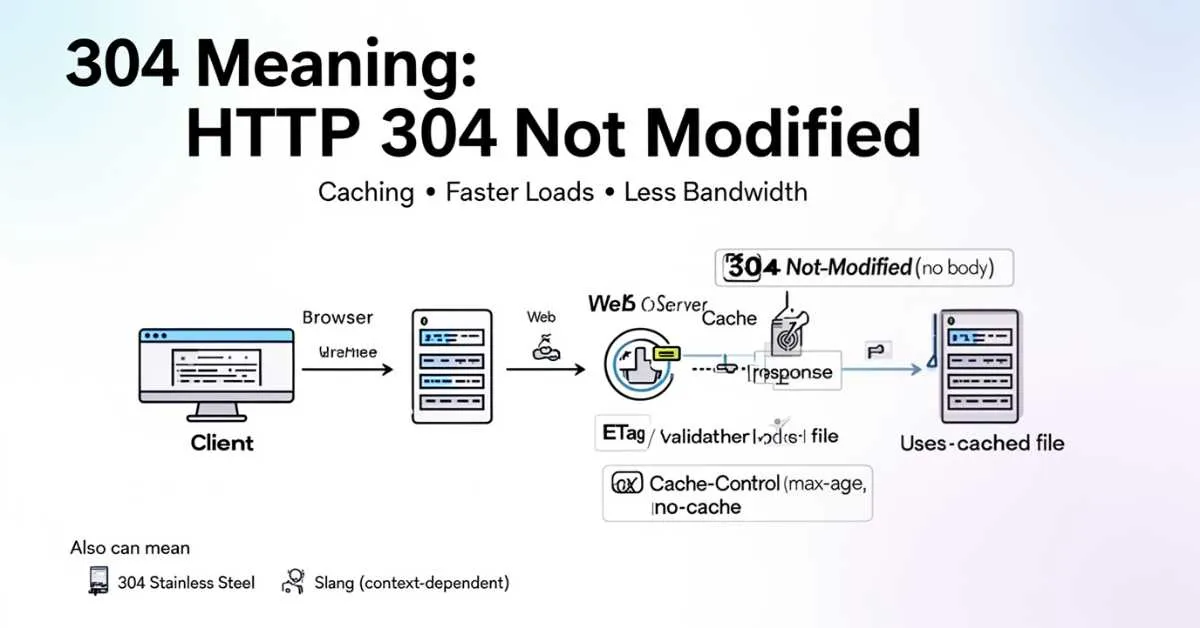
304 isn’t a bug; it’s your website saying “Nothing changed, reuse what you already have.” In technical terms, HTTP 304 Not Modified is a response code that tells the browser to load a saved file from cache instead of downloading it again. That tiny message can be the difference between a page that feels instant and one that feels heavy, because it saves bandwidth, reduces server work, and keeps repeat visits fast.
If you’ve ever opened Chrome DevTools and suddenly seen a wall of “304” lines, you’re not alone. For many people, that moment sparks a worry: Is something broken? Is Google seeing my updates? Why isn’t my new design showing?
Here’s the truth: 304 is usually a sign caching is working; but when cache rules, ETags, CDNs, or file versions aren’t handled correctly, 304 can also hide real changes and make your site look “stuck.” This guide breaks down every common meaning of 304, with the web/server meaning first, so you can understand it quickly and fix the right thing.
304 Meaning
Most of the time, 304 means HTTP 304 Not Modified.
It is a server response that tells your browser: “This file is unchanged. Use your cached copy.”
Expert summary box
Expert takeaway: HTTP 304 is a performance optimization signal, not an error. When your caching is set up well, it lowers server load, saves bandwidth, and supports faster pages. Faster-loading pages can improve how users feel about your site.
They can also boost Core Web Vitals, which Google says are important for doing well in Search.
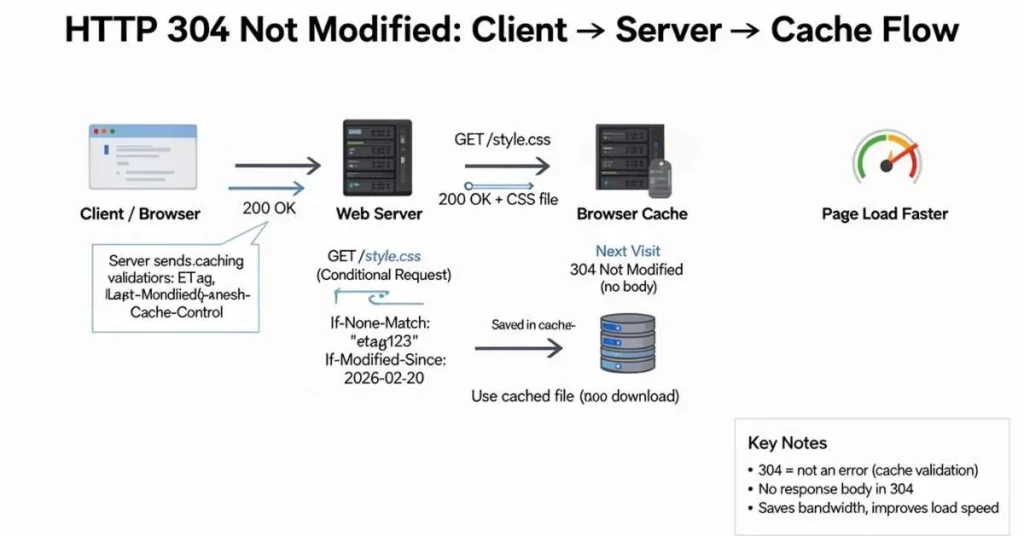
Visual diagram: Client → Server → Cache → 304 flow
[Client / Web Browser]
        |
        |  1) Request: GET /style.css
        v
     [Web Server]
        |
        |  2) First visit: 200 OK + file + cache info (ETag / Last-Modified)
        v
   [Browser Cache]
        |
        |  3) Next visit: browser asks "Changed?" (conditional request)
        v
     [Web Server]
        |
        |  4) If unchanged: 304 Not Modified (no body)
        v
   [Browser Cache]  --> Browser uses saved file (faster load)
This is the client server model in simple form: client = browser, server = web server.
HTTP 304 meaning
What is HTTP 304 Not Modified?
HTTP 304 Not Modified means the server is telling the client:
“You already have a valid copy. I don’t need to send it again.”
So the server sends a small response. The browser uses the saved file from the web browser cache.
Important rule
A 304 response does not include content (no message body). That is a rule in the HTTP standard.
When 304 is GOOD vs BAD
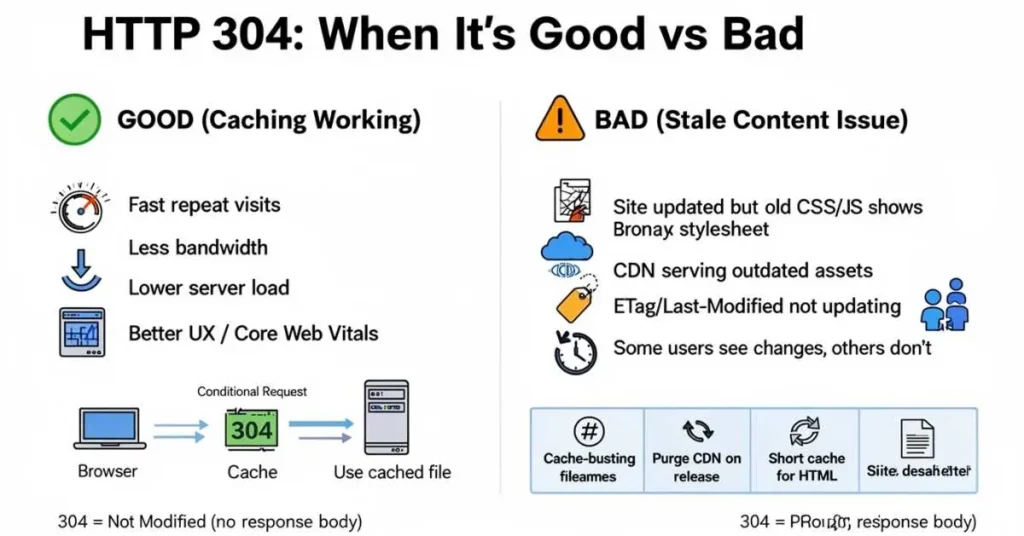
This section gets clicked a lot because it answers the real question.
✅ When 304 is GOOD
304 is good when:
- Your site loads fast after the first visit
- Images, CSS, and JavaScript reuse cached files
- Your server sends less data (saves bandwidth)
- Your pages feel faster (better page load speed)
In short: 304 often means caching is working.
⚠️ When 304 is BAD (or feels bad)
304 becomes a problem when:
- You updated your site, but users still see the old design
- New CSS or JS changes do not show
- Only some users see updates (often a CDN cache issue)
- Your server keeps saying “Not Modified” even after real changes
In short: 304 is bad only when your cache rules are wrong.
How HTTP 304 happens
Step 1: First visit (200 OK)
- Browser requests
app.js - Server replies 200 OK and sends the full file
- Browser saves it in the cache
Step 2: Next visit (conditional requests)
On the next visit, the browser may not download the full file right away.
Instead, it makes a conditional request, meaning it asks: “Has this changed?”
Step 3: Server response
- If the file changed → 200 OK with new content
- If the file did not change → 304 Not Modified (no body)
The headers behind 304
These are the common “signals” used in caching.
1) ETag (a file fingerprint)
ETag is like a fingerprint for a file. The browser can send it back to check if it is the same.
2) Last-Modified (last change time)
The server tells the last change time. The browser can ask Has it changed since then?
3) HTTP cache control (Cache-Control rules)
HTTP cache control uses headers like Cache-Control to set caching rules.
Simple examples:
max-age=3600→ keep it for 1 hourno-cache→ you may store it, but you must check before usingno-store→ do not store it
Big point: no-cache does not mean “no caching.” It often means “re-check,” which can lead to 304.
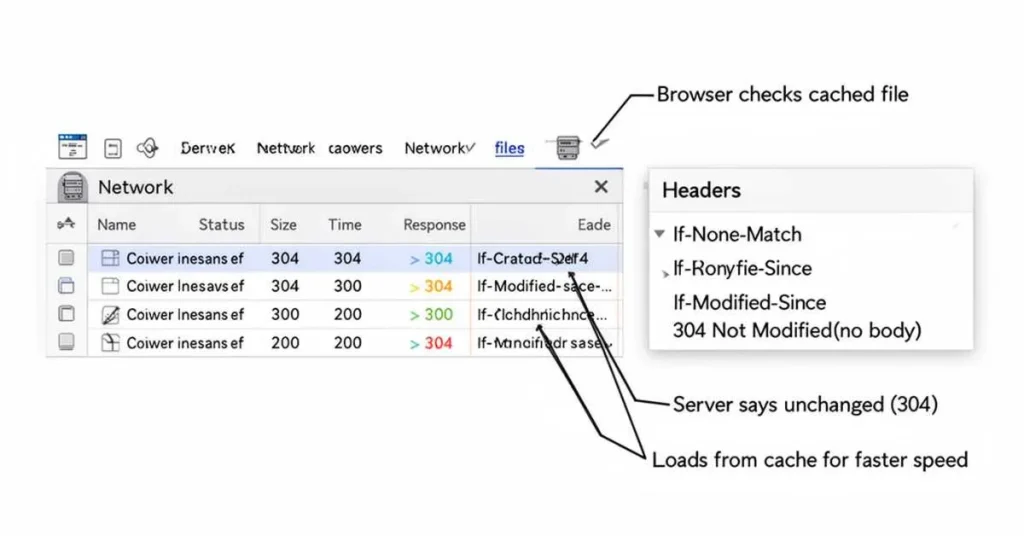
Real-world example: Why you see 304 in Chrome DevTools
Many people search this exact thing.
What you see
In Chrome:
- Open DevTools (F12)
- Go to Network
- Reload the page
You may see a lot of requests with status 304.
Why it happens
- Your browser cached files from earlier visits
- DevTools shows each request clearly
- The browser checks if cached files are still valid
- If they are valid, the server replies 304 Not Modified
Also, a 304 saves download size, but it still has a quick request/response trip. That is why some items might show 304 instead of “from disk cache.”
Quick testing tip (safe and simple)
- In DevTools → Network, try Disable cache (only while DevTools is open)
- Reload once with cache ON
- Reload once with cache OFF
- Compare what changes
304 vs other status codes
- 200 OK: full content is sent
- 304 Not Modified: use cached content (no body)
- 301 / 302: redirect to another URL
- 404: not found
How to fix “stale content” problems
If users don’t see updates, don’t “kill caching.” Fix it the right way.
Fix 1: Cache-bust your assets (best solution)
Change filenames when files change:
app.v12.jsapp.a1b2c3.jsstyle.v5.css
Now browsers download the new file because it is a new URL.
Fix 2: Use smart website caching rules
Simple best practice:
- HTML: shorter caching (updates often)
- CSS/JS/images: longer caching (for speed) + cache-busting
Fix 3: Make sure ETag / Last-Modified update
If these do not change when the file changes, the server may return 304 by mistake.
Fix 4: If you use a CDN, purge cache on release
A CDN may hold old files. Purging fixes “some users see old versions.”
Conditional requests and Googlebot caching behavior
Here is a ranking differentiator: Google’s crawlers that support caching use conditional requests.
Google explains:
- Googlebot may send
If-None-Matchwith a savedETag - If the ETag still matches, the server should return HTTP 304 Not Modified with no HTTP body
What this means for your site
- If your page truly did not change, 304 is fine
- If your page changed but you still return 304, Google may not see your updates fast
SEO-safe checklist
- Make sure ETag and Last-Modified change when content changes
- Don’t cache HTML too long if you update often
- Use cache-busting for CSS/JS so Google and users get fresh assets
- Aim for fast real-user performance (Core Web Vitals)
304 for APIs and apps
304 can also appear in APIs. If a client asks for the same data again, it can re-check using conditional requests. If unchanged, 304 avoids sending the full JSON again. This is part of HTTP caching rules.
304 stainless steel meaning
If “304” is on a bottle, sink, cookware, or metal sheet, it often means Stainless steel 304.
What is Stainless steel 304?
- It is one of the most common stainless steel grades
- It is an austenitic stainless steel (a common stainless family)
- It is known for good corrosion resistance in many normal uses
American Iron and Steel Institute (AISI)
In industry, people often call it AISI 304. The British Stainless Steel Association also uses the term “American AISI basic grades” when it talks about the 304 and 316 families.
304 slang meaning
Online, “304” can be internet slang. You may see it on social media platforms like TikTok and Reddit.
In some posts, people use “304” as an insult (often aimed at women). This use is negative and disrespectful. This section is only to explain what you may have seen online.
Tip: If the post is about browsers, code, websites, logs, or speed, it is almost always the HTTP status code meaning.
FAQs:
Why do I see 304 status code in Chrome DevTools?
Because your browser is using website caching and making conditional requests. If the file did not change, the server response is 304.
Is 304 Not Modified an error?
Usually no. It is a normal HTTP status code used for caching.
Can a 304 response include content?
No. HTTP rules say 304 responses do not include content (no message body).
How can I do fix “site not updating” after changes?
Use cache-busting for assets, set clear HTTP cache control rules, ensure validators update, and purge CDN cache if needed.
Does 304 help page load speed?
Often yes, because it saves downloads and bandwidth.
Conclusion:
“304” looks confusing at first, but it usually isn’t a problem at all. In web browsing and developer tools, HTTP 304 Not Modified is simply your server confirming that a file hasn’t changed; so the browser can reuse the cached version. When your cache headers, ETag, and Last-Modified values are configured correctly, 304 responses save bandwidth, reduce server load, and help pages feel faster.
The only time 304 becomes “bad” is when people keep seeing old designs after you’ve updated your site. In that case, don’t turn caching off; fix it the smart way: cache-bust your CSS/JS filenames, keep HTML caching shorter, and purge CDN caches during releases so users and Google can get fresh updates.
Read Also This Post: What Does White Snot Mean: Normal, Cold, Allergy Explained

Hi, I’m Clara Lexis from Meanvia.com. I break down words and expressions so they’re easy to understand and enjoyable to learn. My mission is simple: make language approachable and fun, one word at a time.